
When you’re sick of all this entitlement and nerd shit,
Amy has requested that this reminder be “likely” to lead you people back to safety.
By unpopular demand
Boy has it been a while.
I have much I want to write about here, and I’m going to do my damnedest to put it all here, but not in a rush; I’m making a mission out of my wishes to see to creative endeavours of mine on a basis with any regularity.
I’m not gonna say anything about that yet because I want to see any evidence that my methods work before I start punishing your eyes for the crime against yourself for choosing to read about my thoughts and feelings.
Well… bye. Thanks for checking out the Amyzone, once again! No, let me try again, uh… made you look! Sucker.
SUCKER-FREE ZONE
You are obligated under threat of your computer monitor BLOWING UP and sending millions of shards of heated glass and otherwise into your FACE and EYES if you proceed past this point and would be revealed as a sucker in the usual circumstances.
Glad you could make it. Now I can keep the good stuff and more of it, not just for me but especially for you. What I have for you today and right now is something big. So big, in fact, that I didn’t want to put it on this page because I didn’t want it to make the remaining text seem utterly puny in comparison.
See the first of these articles by clicking on that part of the sentence appearing to link to another, magical place. It’s about YouTube, everyone’s favorite, and probably ’only’ option for doing the one simple thing it can’t manage without being a pain in the ass.
zellij
zellij is a terminal multiplexer. Terminal multiplexers you may be
more familiar with probably include tmux or screen.
In case you don’t know what a terminal multiplexer is, I’ll explain
tmux real quick.
Imagine a terminal. Mine looks like this.

I use the fish shell because I like color in my command lines.
You can do a lot with a lone command line. However, sometimes you want multiple terminal programs running at the same time. If you run a program that does a continuous operation you would normally have to stop the process before doing something else.
Enter the terminal multiplexer. In short, it allows you to run a
session in which you can spawn multiple ’tabs’ (tmux refers to these
as windows) and panes, as many as you want.
In the following example I have btop open on the same terminal screen
as my preferred editor, Neovim.
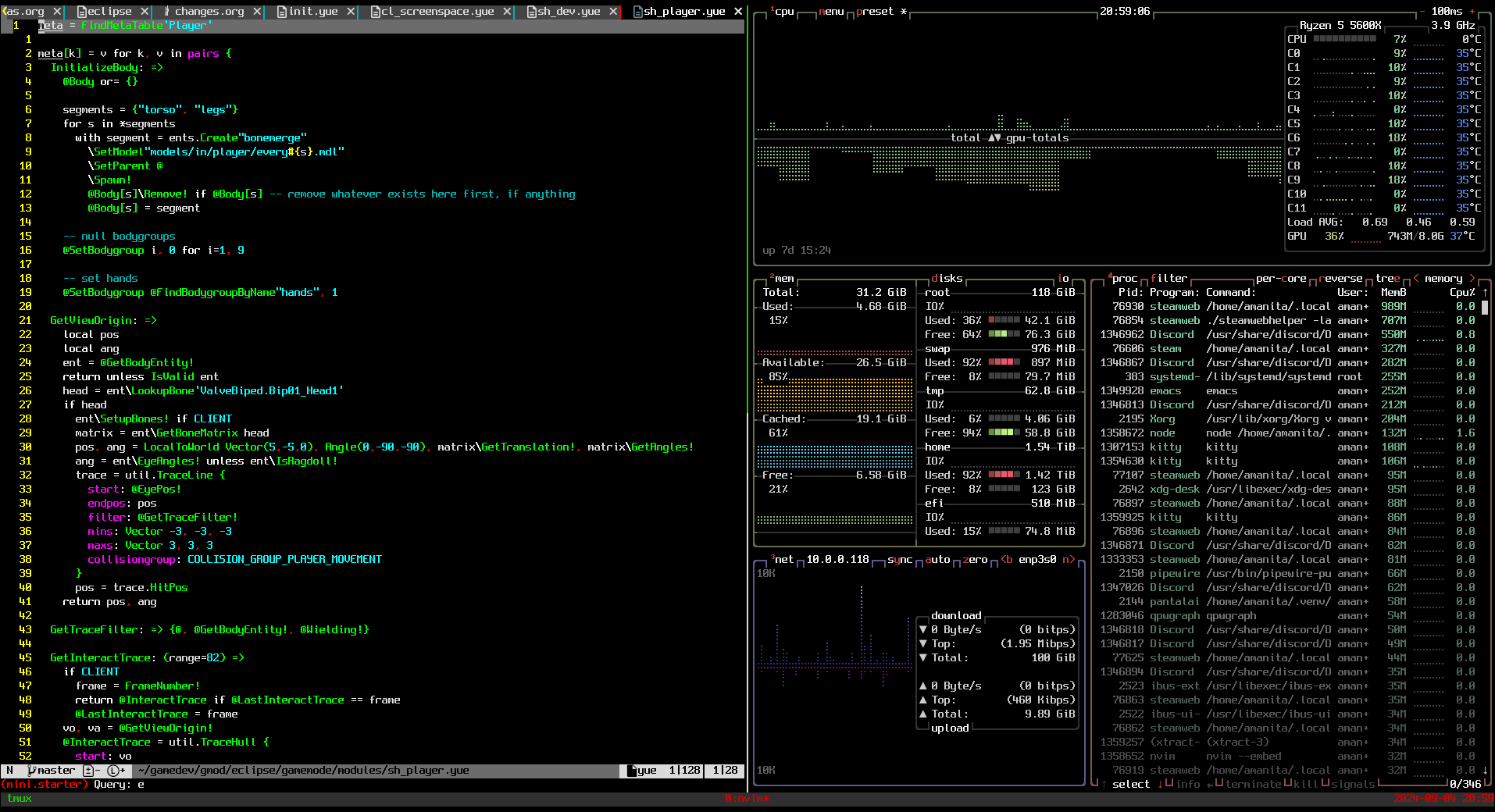
At any time I can split the window vertically or horizontally and open new programs wherever I like. It’s a wonderful tool.
So how does zellij outdo tmux?
tmux is a lot older and has had more time and a larger community to
develop plugins and other extensions for it. It is also very
customizable, arguably easier to do this with than zellij.
One thing tmux cannot do, however, is proper collaborative or
’multiplayer’ terminal usage.
If you have multiple users attached to the same tmux session at the
same time, everyone will see what’s focused and what’s happening. This
is good only if one person is doing things at a time. The cursor is
singular and multiple users cannot interact with the terminal(s) at
the same time as each other.
zellij does allow this.
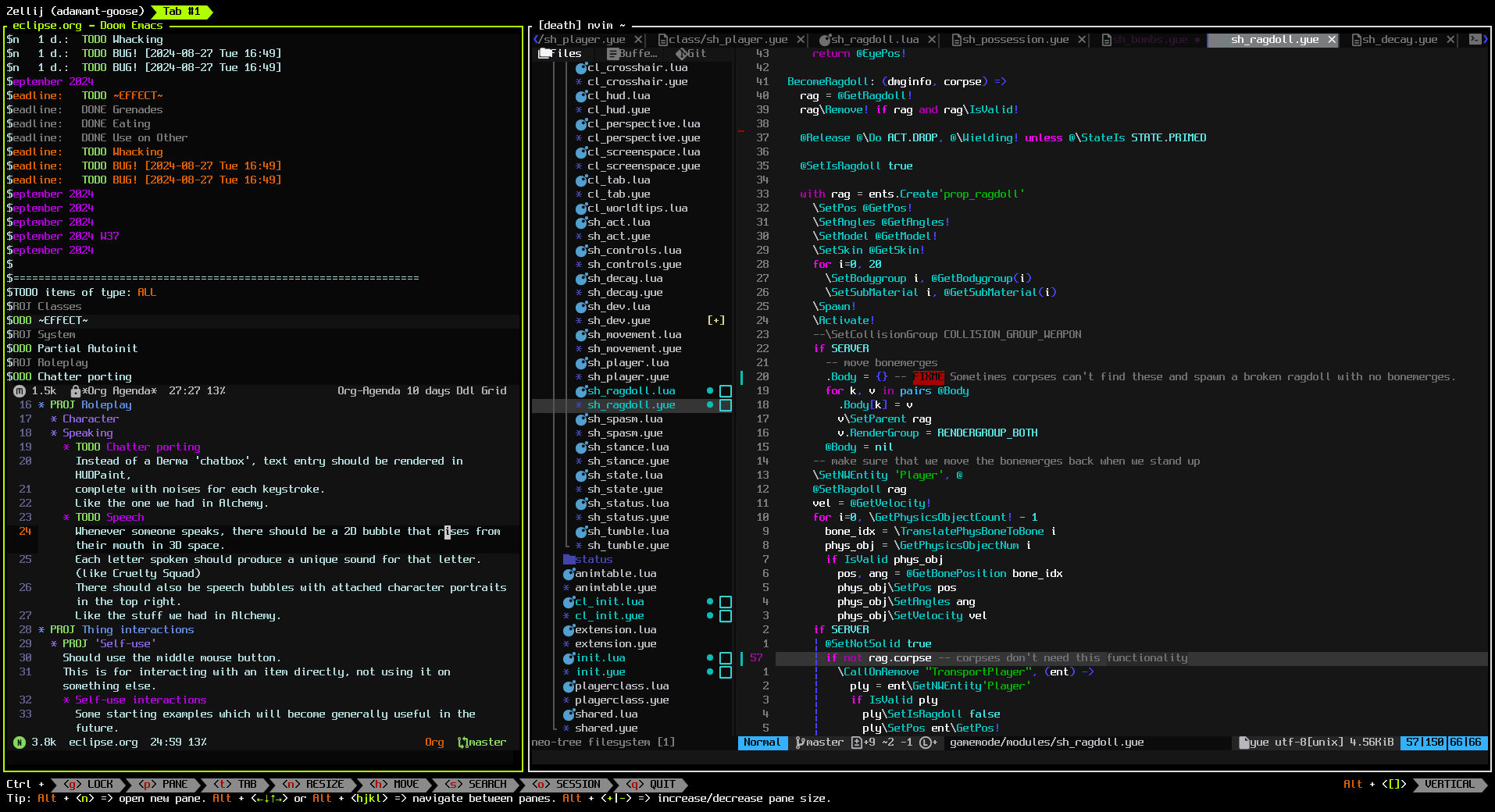
In this screenshot, both Doom Emacs and Neovim are open side by side.
Imagine there are two users working on a project. One can do programming on the right, the other can do tracking of bugs or ideas or other information and manage the agenda and whatnot of the project.
For me, where customization and extensions are concerned, zellij does
leave a bit to be desired – but it can be forgiven for that, being as
relatively new as it is, and despite that this one feature makes it
stand out in a way that’s hard to ignore. Collaboration with others in
this way is very fun, very fast, and doesn’t lead to stepping on each
other’s toes as often as can happen under the same conditions on tmux.
herbstluftwm
I’ve been wanting to get off i3 for a bit. I’ve never been one for status bars or the other things users generally have to do in order to make it more interesting. It has a number of layout features and overall (or at least it seems to be this way to me) feels as though it leans more towards people who use their mouse to orient windows and such.
I fucking hate that, but there are times when I do like using the mouse for things, like resizing windows. I used to be into Ratpoison but the lack of any possible mouse control was one of several problems I had with it. The lack of anything like (optional) window decorations bothered me too.
After downloading herbstluftwm and giving it another spin, it didn’t
take me long before I was able to configure it like this:
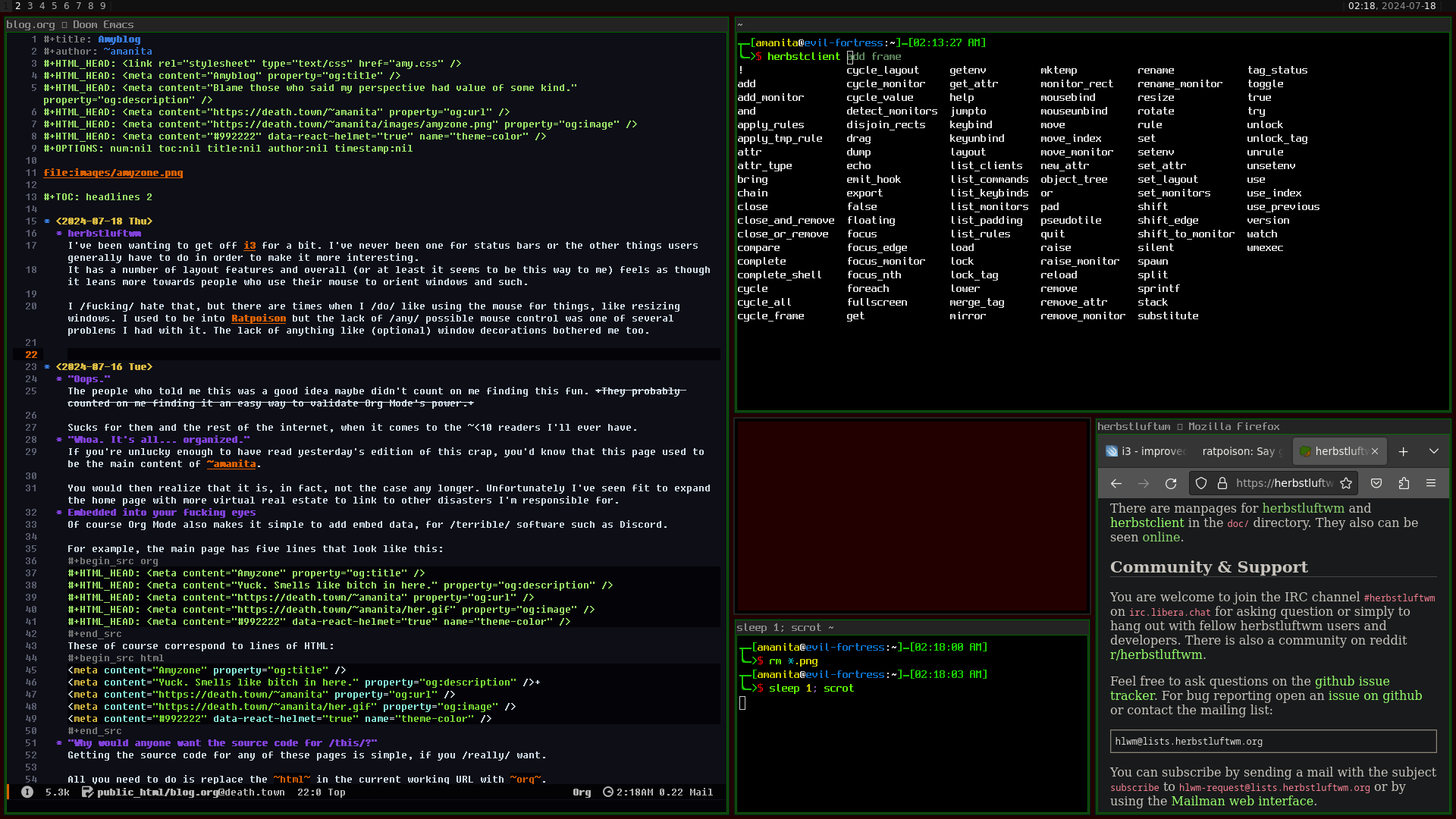
Now I’m in love with it. There are several things about this screenshot worth mentioning:
- That empty space in the center-right is what’s known as a frame, I think. Whether there is a window inside a frame or not, it can be sized to adjust its dimensions and the dimensions of frames around it.
- The colors of every box-like shape on the screen is customizable. I’ve made it so that inactive windows have darker greens and active windows have brighter greens.
- Setting a background image usually requires a program like
fehornitrogenor something like that which I am too lazy to deal with configuring.herbstluftwmhas a line in its template config file that deals with setting a simple background color so I could figure that out in no time. herbstclientis the command used to communicate withherbstluftwm. It features TAB completion for shells, includingfish. Thank fucking God.I’m probably gonna write another section about this window manager whenever I can collect them all better, but I’ll point out one more thing it does better over
i3: not only does it have<Mod>+<Arrow>controls for changing window/frame focus by default, it also has<Mod>+h/j/k/lfeatures for the same thing. Moving windows? Same shit, but holdSHIFT. Resizing windows also goes the same except you holdCTRL.While I’m sure it wouldn’t be impossible in the slightest to do these things in
i3, it definitely doesn’t come like that, and my reluctance to deal with the configuration format had me moving and resizing my windows all the time with my mouse like some kind of sick freak.I feel as if I have been standing my whole life and I just sat down.
“Oops.”
The people who told me this was a good idea maybe didn’t count on me
finding this fun. They probably counted on me finding it an easy way
to validate Org Mode’s power.
Sucks for them and the rest of the internet, when it comes to the ~<10 readers I’ll ever have.
“Whoa. It’s all… organized.”
If you’re unlucky enough to have read yesterday’s edition of this crap, you’d know that this page used to be the main content of ~amanita.
You would then realize that it is, in fact, not the case any longer. Unfortunately I’ve seen fit to expand the home page with more virtual real estate to link to other disasters I’m responsible for.
Embedded into your fucking eyes
Of course Org Mode also makes it simple to add embed data, for terrible software such as Discord.
For example, the main page has five lines that look like this:
  #+HTML_HEAD: <meta content="Amyzone" property="og:title"
  /> #+HTML_HEAD: <meta content="Yuck. Smells like bitch in here."
  property="og:description" /> #+HTML_HEAD: <meta
  content="https://death.town/~amanita" property="og:url"
  /> #+HTML_HEAD: <meta content="https://death.town/~amanita/her.gif"
  property="og:image" /> #+HTML_HEAD: <meta content="#992222"
  data-react-helmet="true" name="theme-color" />

These of course correspond to lines of HTML:
<meta content="Amyzone" property="og:title" />
<meta content="Yuck. Smells like bitch in here." property="og:description" />+
<meta content="https://death.town/~amanita" property="og:url" />
<meta content="https://death.town/~amanita/her.gif" property="og:image" />
<meta content="#992222" data-react-helmet="true" name="theme-color" />
“Why would anyone want the source code for this?”
Getting the source code for any of these pages is simple, if you
really want. All you need to do is replace the html in the current working URL with
org.
To get the source code for this page, you’d go to your browser’s address bar and change
https://death.town/~amanita/blog.html
to
https://death.town/~amanita/blog.org
If you’re still somehow unfamiliar with the .org format, you should
read all about Org Mode. That website is also created with Org Mode,
by the way, just like this one.
If you aren’t already an Emacs user please consider Doom Emacs, for the sake of your pinky finger. It’s great for both those with experience with Vim’s controls and for those still yet to learn it. (I can’t tell you just how much it is worth it to become familiar with the Vim control scheme. Fucking do it already.)
“Someone needs better things to do with their time.”
If you hadn’t read this page before this segment was added, you have no idea what kind of an upgrade the Amyzone got. It wasn’t even called the Amyzone at the time, or at least it didn’t have a banner graphic.
Lots of new things – blinkies, music shit, and more. Whoaaa.
“Oh boy… Git.”
The source for the Amyzone is now kept in a Git repo.
Can’t imagine why you might want it, but if you do,
git clone ssh://death.town:23231/amyzone
“You should do a blog or something!”
Here it is.
nano
I hate nano so goddamn much. More details later.
I might not hate it as much as I hate VS Code.
Using Org Mode to do blog-like pages
Org Mode is fantastic. Within literal minutes and no tangible/absorbed/retained experience with HTML whatsoever I had this page up from the mere suggestion that somebody may actually read it.
This page and the .css file styling it were are written remotely on
death.town itself from Doom Emacs running locally on my machine. Even
the rendering-to-HTML of the .org document comprising this ’blog’ is
done remotely.